STEP 01
Search
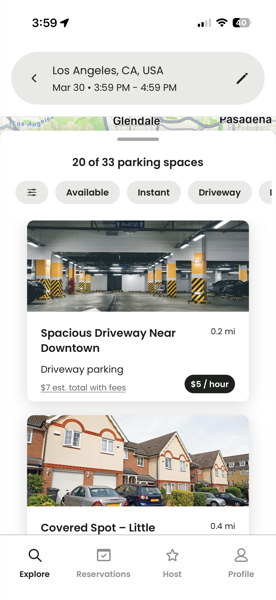
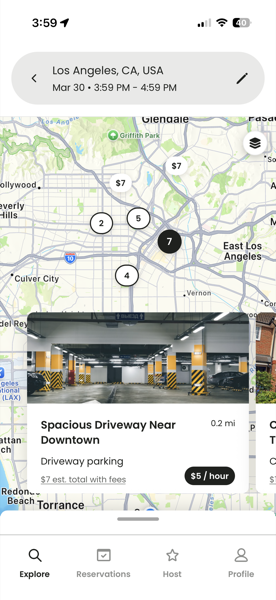
Enter your destination. Kotse shows nearby parking spots from real hosts, driveways, garages, lots, sorted by distance and price.
Kotse connects drivers with nearby parking from real hosts. Pick a spot, book it, pull in. Hosts earn from driveways and lots that would otherwise sit empty.

Finding parking on Kotse takes seconds. No meters, no circling, no surprises at the gate.
Enter your destination. Kotse shows nearby parking spots from real hosts, driveways, garages, lots, sorted by distance and price.
Pick a spot and tap book. Instant-book spots confirm right away; others take up to 3 hours for the host to approve. No charge until confirmed.
Open the reservation for the exact address and parking directions. Roll in, stay for your booked window, done.
Browse real-world prices from people near you. Most Kotse spots beat street meters, garages, and event parking by a wide margin.
Every checkout breaks down the reservation fee and service fee before you pay.
For approval spots we place a hold, not a charge, until the host accepts within 3 hours.
Full refund, including the service fee, if you cancel ahead of your reservation start.
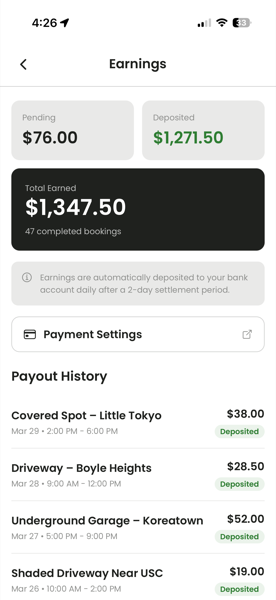
If you've got a parking space sitting empty, list it in under two minutes. Daily payouts straight to your bank, we handle the payments, taxes, and customer side.
Connect a bank account and verify with Stripe, then you're ready to accept bookings.
Stripe deposits your earnings to your bank on a daily rolling basis after a short settlement holding period.
Set a 3-hour approval window on every request, or enable instant booking for hands-off hosting.
Going out of town? Toggle your listing off. Disconnect Stripe and all bookings pause instantly.
Real numbers, no math homework. Here's how a $10 booking shakes out for both sides.
The host's hourly rate plus a small service fee. The exact total shows on every checkout, so there are no surprises when you pull in.
Your hourly rate, less a small platform fee. Deposited to your bank daily through Stripe. Kotse only earns when you do.
Service fee is the greater of $2 or 12%. Platform fee is the greater of $1 or 5%. The minimums kick in on very small bookings to cover card processing.
Payments, refunds, and disputes go through Stripe. Kotse is the merchant of record, so drivers and hosts don't have to sort out billing directly.
Stripe processes every transaction. Your card number never touches Kotse's servers. PCI Level 1 certified.
Cancel up to 1 hour before your reservation for a full refund. Holds are released immediately when requests are declined or expire.
Host addresses are hidden until your reservation is confirmed. Location access is "when in use" only, we never track you in the background.
Open the app, tap Host, list your parking spot, then connect a bank account through Stripe and complete its identity verification. Once Stripe verifies you, guests can start booking.
You connect a bank account and complete Stripe's identity verification, required by U.S. tax and anti-fraud laws and handled entirely on Stripe's side. You can start accepting bookings once Stripe verifies your identity and enables payouts.
Stripe deposits earnings to your bank automatically on a daily rolling basis, after a settlement holding period of about a week that protects against fraud and disputes.
Yes. Cancel up to 1 hour before the start time for a full refund, including the service fee. For pending requests awaiting host approval, cancel anytime.
Download Kotse free on iOS and Android.